Payroll: run, review and finalize monthly salaries
Updated 2026-11-07
What it is
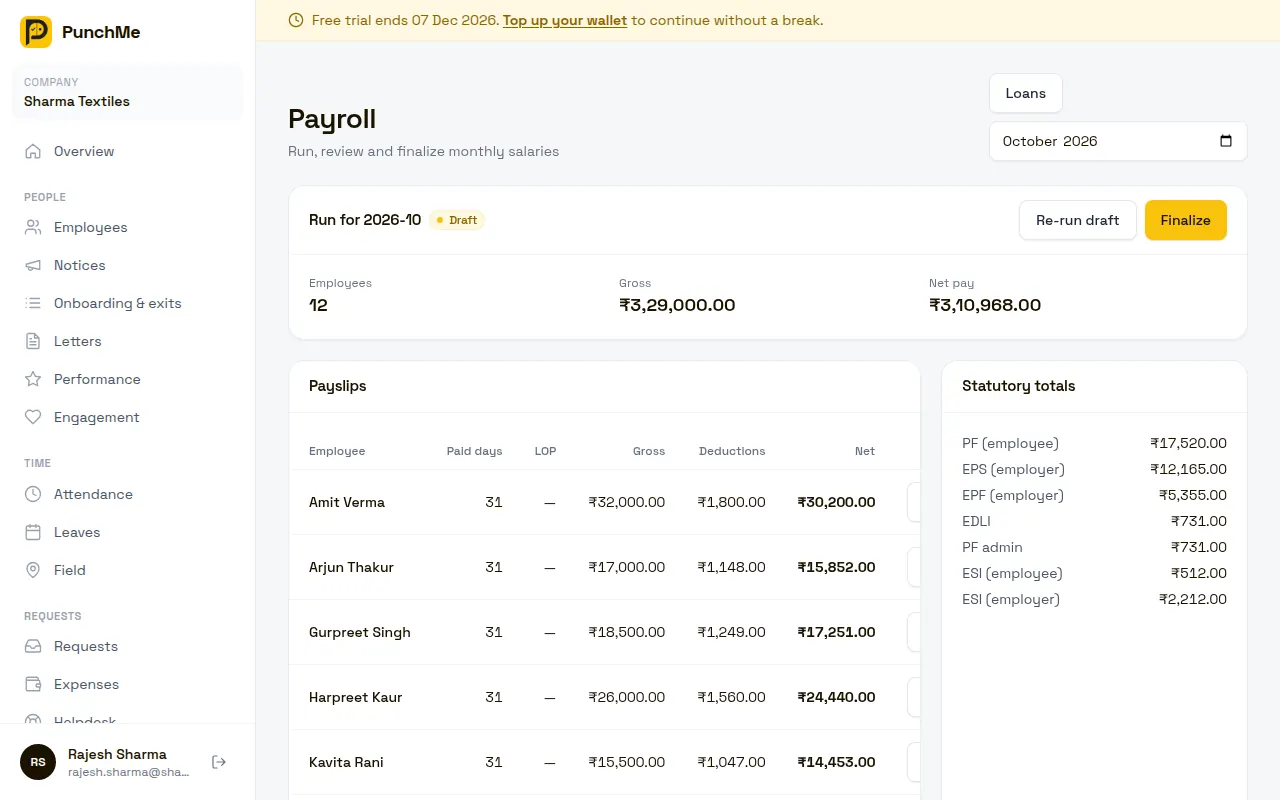
Payroll is the monthly salary run in PunchMe. You create a draft for a month, check the payslips, fix what is wrong, and then finalize it. Finalizing locks the month, publishes payslips to employees and unlocks the statutory, bank and accounting files.
PunchMe works out pay from the employee's salary structure, attendance, unpaid leave, overtime, approved expense claims and loan recoveries. You do not type in anyone's monthly figures by hand.
This page covers the monthly run. For the parts that feed it, see:
- Salary structure: components, pay basis and history
- Statutory compliance: PF, ESI, PT, LWF, TDS, bonus, gratuity and F&F
- Payslips: what employees see
Who uses it
| Permission | What it allows |
|---|---|
| payroll.view | Open the Payroll page, see runs and payslips, download PF ECR, ESI, TDS annexure, Tally XML and Journal CSV |
| payroll.manage | Run and re-run drafts, finalize, adjust payslips, download bank files, mark paid, pay via RazorpayX, manage loans |
| settings.view / settings.edit | See and change the Payroll rules card (overtime, comp-off, loans, Tally ledgers) and the Payroll card in Settings |
The built-in HR role has both payroll permissions. The company owner can do everything.
Payroll is company-wide. A member whose role is limited to one office or team cannot open payroll, even with the payroll permissions. They see "Payroll needs company-wide access". See Roles and permissions.
Where to find it
- Payroll in the dashboard menu. Pick the month in the top right.
- Payroll, Loans for loans and salary advances. See Loans and advances.
- Settings, Payroll card for maker-checker, statutory bonus, gratuity provision, the leave encashment divisor and the 50% wage rule.
- Payroll rules card at the bottom of the Payroll page for overtime, comp-off, employee loan requests and Tally ledger names.
Turning it on or off
There is no switch for payroll itself. An employee is included in a month's run when all of these are true:
- They have a salary structure with an Effective from date on or before the last day of the month.
- Their joining date is on or before the last day of the month, or blank.
- They are active, or their last working day falls in or after that month.
Employees without a salary structure are silently left out. The Payroll page reminds you of this when there is no run yet.
Settings that change how the run behaves:
| Setting | Where | Default |
|---|---|---|
| Maker-checker: someone else must finalize | Settings, Payroll | Off |
| Statutory bonus rate | Settings, Payroll | Blank (off) |
| Show gratuity provision | Settings, Payroll | Off |
| Leave encashment divisor | Settings, Payroll | 26 |
| Enforce Basic+DA ≥ 50% of gross | Settings, Payroll | Off |
| Pay overtime | Payroll rules | Off |
| Overtime and comp-off need approval | Payroll rules | On |
| Employees can request loans / salary advances in the app | Payroll rules | Off |
The monthly run, step by step
- Open Payroll and pick the month. The default is last month.
- Click Run payroll. PunchMe builds a draft payslip for every included employee.
- Check the totals, the Payslips table and the Statutory totals card.
- Click View to open any payslip. Click Adjust to add one-off earnings or deductions, such as an incentive or a recovery.
- Fixed something upstream, such as attendance, leave or a salary structure? Click Re-run draft. PunchMe recalculates everyone and keeps your manual adjustments.
- When everything is right, click Finalize and confirm.
When you finalize:
- The run is locked. It cannot be re-run or turned back into a draft.
- Employees get a "Payslip ready" push notification and can see the payslip in the app.
- The PF ECR, ESI, TDS annexure, bank file, Tally and journal downloads become available.
- Arrears, loan balances and year-to-date tax for later months are calculated from finalized months only.
What feeds the run
| Input | How it affects pay |
|---|---|
| Salary structure | The latest version effective on or before the month end is used for the whole month |
| Attendance | Each absent day is 1 day of loss of pay (LOP). Each half day is 0.5 LOP |
| Unpaid leave | Approved leave of a type that is not paid counts as LOP, on working days only |
| Joining or exit mid-month | Days before joining and after the last working day count as LOP |
| Overtime | Approved overtime hours become an Overtime earning |
| Expense claims | Approved claims set to be paid in payroll are added as reimbursement lines |
| Loans and advances | The month's EMI is deducted as a Loan recovery or Salary advance recovery line |
| Exit | In the last working month, leave encashment, gratuity and full loan recovery are added |
Paid days = days in the month minus LOP days. Monthly components are prorated on paid days. For daily and hourly pay, see Salary structure.
Fix attendance before you finalize. See Absent and half day, Corrections and Leaves.
Overtime in payroll
Turn on Pay overtime in Payroll rules. Then:
- On a working day, minutes worked beyond the shift count, once they reach the Count after (minutes beyond shift) value. The default is 30 minutes.
- Hourly rate = monthly gross ÷ working days in the month ÷ shift hours. It is then multiplied by the Rate: 1×, 1.5× (default) or 2×.
- Monthly cap (hours) limits the paid hours. Blank means no cap.
- If Overtime and comp-off need approval is on, only entries approved under Attendance, Overtime are paid.
Employees with no shift are treated as having an 8-hour shift. See Overtime and comp-off.
Expense claims in payroll
An approved claim set to be paid through payroll joins that month's run. A claim whose month was already finalized without it joins the next run. A claim is never paid twice. Taxable claims count towards gross pay. Non-taxable claims are added to net pay but kept out of PF, ESI, PT and TDS. See Expenses.
Maker-checker
Tick Maker-checker: someone else must finalize in Settings, Payroll. Then the person who first ran the draft cannot finalize it. Someone else with payroll.manage must check it and click Finalize.
Two things to know:
- "Ran the draft" means the person who first clicked Run payroll for the month. Re-runs don't change it, so a checker can re-run the draft and still finalize it.
- The company owner can always finalize, even their own draft.
Changing it midway
Draft runs. You can re-run a draft as often as you like. Each re-run picks up the latest attendance, leave, salary, overtime, claims and loans. Manual adjustments stay. Employees who no longer qualify, for example because you changed their joining date, are dropped from the draft.
Finalized runs. You cannot re-run them. To correct one payslip, click Adjust, change the lines, and enter a Reason for correction. PunchMe keeps the old version and shows a rev 1, rev 2 badge. The employee sees the corrected payslip with its revision number and gets an in-app and push notification with your reason.
A correction recalculates the whole payslip from today's data, not only the line you changed. If attendance or salary for that month has changed since you finalized, those changes come in too. Check the new figures before you save.
Salary change partway through a month. PunchMe does not split a month between two salary versions. The version in force on the last day of the month is used for the whole month. To pay part of the month at the old rate, add an adjustment.
Backdated salary increase. Add a new salary structure with an earlier Effective from date. In the next run, PunchMe adds arrears for every finalized month of the same financial year (April to March) that was paid at the old rate. See Salary structure.
Paying salaries
After you finalize, the Pay salaries & accounting card appears.
Bank upload file
Choose a Bank upload file, set the Payment date, and click Download. You need payroll.manage because the file has account numbers.
| Option | Format |
|---|---|
| HDFC ENet bulk (unverified layout) | HDFC ENet columns, no header row. HDFC-to-HDFC rows use type I, others use NEFT |
| ICICI, SBI, Axis, Kotak | Generic NEFT CSV |
| Generic NEFT bulk CSV | Beneficiary name, account, IFSC, amount, mode, date, narration, reference |
- Employees already marked paid, or with a RazorpayX payout in progress or done, are skipped.
- Employees with zero or negative net pay are skipped.
- If any included employee has no bank account or IFSC, the download stops and lists their names.
Check the file against your bank's current bulk upload template before you upload it. The HDFC layout has not been verified with the bank. The other banks get a generic format that you may need to map.
Mark paid
Tick employees in the table, add the UTR if you have it, and click Mark paid. Select all unpaid ticks everyone not yet paid.
RazorpayX payouts
If your company has its own RazorpayX account, connect it under Payroll rules, RazorpayX salary payouts. Enter the key ID, key secret, account number and webhook secret, then add the webhook URL shown there in RazorpayX for payout.* events.
Then click Pay via RazorpayX on a finalized run. Money goes from your RazorpayX account straight to employees. It never passes through PunchMe or Hostspica. Payouts go by NEFT and are queued if your balance is low. Failed, reversed, cancelled or rejected payouts can be sent again with Retry failed. Start with a small test.
Accounting exports
- Tally XML: one journal voucher numbered
PAY-YYYY-MM, dated the last day of the month. Import it into Tally. - Journal CSV: the same entries as date, voucher number, ledger, debit, credit and narration, for other accounting software.
Earnings and employer costs are debited. PF, ESI, PT, TDS and LWF payables, loan recoveries and net salary payable are credited. Rename any ledger under Payroll rules, Tally ledger names. Blank fields use the default names.
Limits and edge cases
- The Payroll page lists the last 60 runs.
- A run fails with "No pf rule in force" for months before April 2025. PunchMe's statutory rates start from 1 April 2025.
- There is no undo for finalize. Corrections are the only way to change a finalized payslip.
- Correcting a payslip after it was paid does not change the bank file history or the RazorpayX payout. Pay or recover the difference yourself.
- Loan and advance recovery is capped at what is left after other deductions, so net pay never goes below zero. The part not recovered stays outstanding on the loan.
- Very large companies (thousands of employees) may need support help for a single run.
Related
- Salary structure
- Statutory compliance
- Payslips
- Loans and advances
- Expenses
- Overtime and comp-off
- Absent and half day
- Onboarding and exit
- Data privacy and audit
Common questions
Why is an employee missing from the run?
They have no salary structure effective on or before the month end, their joining date is after the month, or they left before the month started. Add or fix the structure, then click Re-run draft.
I fixed someone's attendance after drafting. What now?
Click Re-run draft. Your manual adjustments are kept. If the month is already finalized, use Adjust with a reason instead.
Can I unfinalize a month?
No. Correct individual payslips with Adjust. The old versions are kept for audit.
Why can't I finalize the draft I just ran?
Maker-checker is on. Someone else with payroll.manage, or the company owner, must finalize it.
Does PunchMe move money from my account?
Only if you connect your own RazorpayX account and click Pay via RazorpayX. Otherwise you download a bank file and upload it to your bank yourself.
Who can see salary figures?
Only people with payroll.view and company-wide access, plus the owner. Bank, PAN, UAN and ESI numbers are stored encrypted. Every run, finalize, correction and file download is recorded in the audit log.