Field tracking, routes and client visits
Updated 2026-11-07
What it is
Field tracking shares a field employee's location with you while they are checked in. You see where they are, the route they took that day, the distance in km, and the client visits they logged.
It is meant for sales, service, delivery and collection staff who work away from the office. Location is never collected when they are checked out, and never without their consent in the app.
Who uses it
| Who | What | Permission |
|---|---|---|
| HR or manager | See the Field page, routes, visits and photos | field.view |
| HR or admin | Turn field tracking on or off for an employee | employees.edit |
| Payroll or finance | Use route distance for a mileage claim | expenses.manage |
| Field employee | Agree to sharing, log client visits | None |
The built-in HR, Office Manager and Office HR roles have field.view. Office-scoped and team-scoped users only see staff in their scope. See Roles and permissions.
Where to find it
- Dashboard map: Field in the side menu.
- Turn on per employee: Employees, open the employee, Field tracking card.
- Employee app: Client visits to log visits. The consent question appears on the home screen.
Turning it on or off
Field tracking is off for everyone by default. You turn it on one employee at a time.
- Open Employees and open the employee's page.
- In the Field tracking card, click Turn on.
To stop it, click Turn off in the same card. Turning it off also withdraws the employee's consent. Both changes are recorded in the audit log.
Only turn it on for people whose job is in the field. Tracking office staff gives you nothing useful and costs their battery.
What happens when it's on
1. The employee agrees
The next time the employee opens the app while checked in, they see Share location while on duty? The message says:
- Your company has turned on field tracking for you.
- While you're checked in, PunchMe shares your location with your employer about every 5 minutes.
- A notification shows while it does.
- It stops when you check out and is never collected off duty.
- Location history, client visits and visit photos are deleted after 90 days.
They tap I agree or Not now. If they tap Not now, nothing is shared. The app asks again the next time it is opened.
Until they agree, the Field page shows them as no consent yet.
2. Sharing while checked in
After consent, sharing starts when they check in and stops when they check out.
- Android: a notification "Sharing location while on duty" with "Stops when you check out" stays visible.
- iPhone: the blue location pill shows in the status bar.
The phone takes a location fix about every 5 minutes and uploads it. If there is no network, the phone keeps the fixes and uploads them later.
Fake GPS fixes are dropped on the phone. Fixes from before check-in, or after check-out, are dropped by the server.
3. Viewing on the Field page
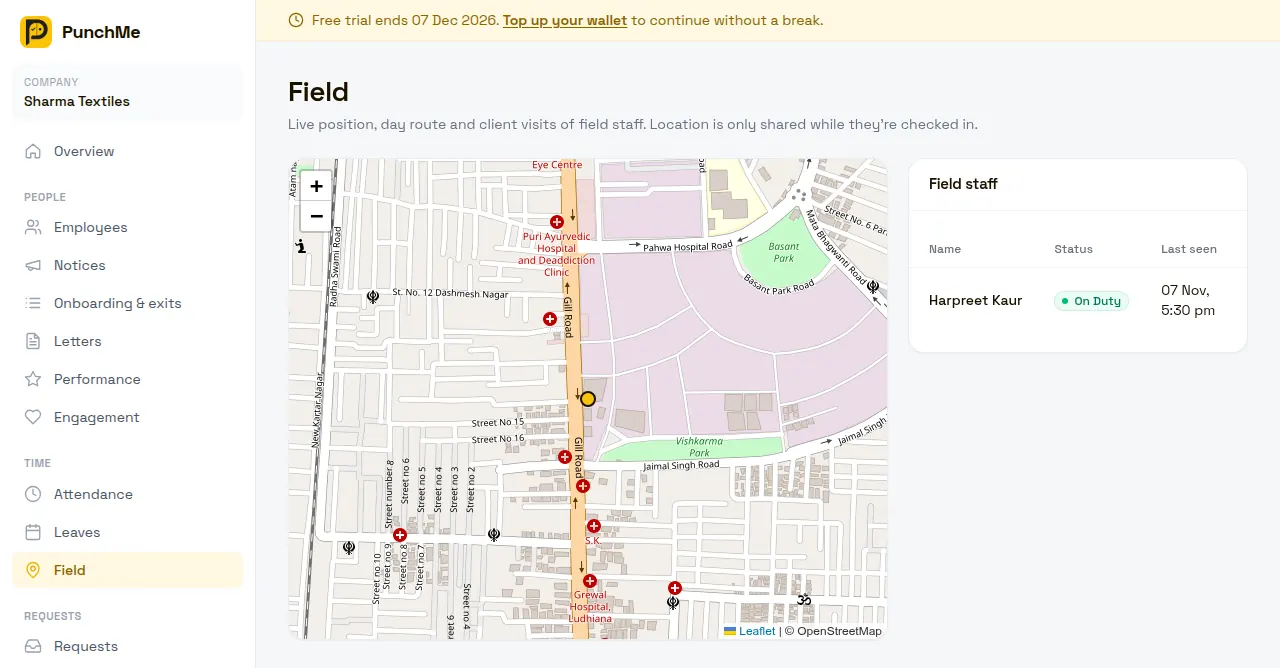
The Field page has a map and a Field staff list.
- All staff view: each person's last position. A yellow dot means on duty. A grey dot means off duty, showing where they were last seen.
- Field staff list: Name, Status (on duty, off duty or no consent yet) and Last seen.
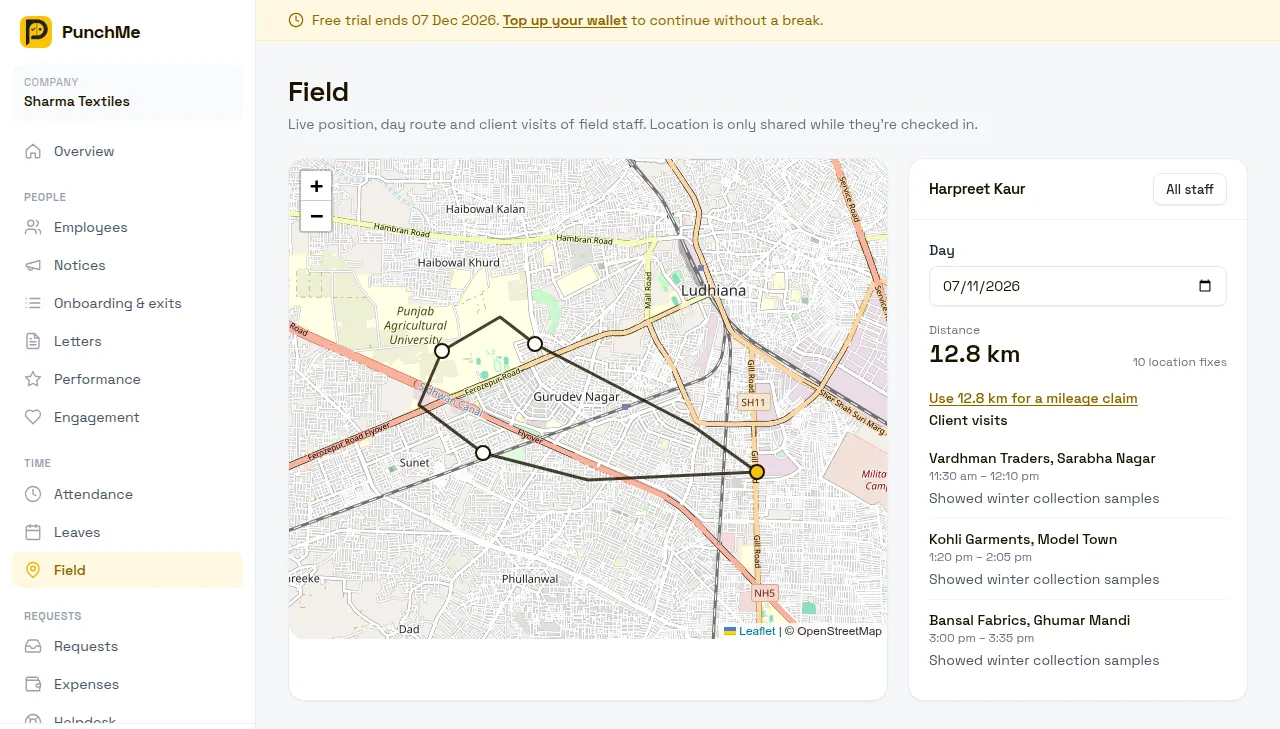
Click a person to see one day:
- Pick the Day. Today is the latest you can pick.
- The map draws their route and marks each client visit.
- Distance shows km travelled, with the number of location fixes.
- Client visits lists each visit with times, note and a Photo link if one was added.
- Click All staff to go back.
How distance is worked out
PunchMe adds up the straight-line distance between fixes in time order. To keep it honest:
- Fixes with accuracy worse than 100 m are kept on the map but don't count towards distance.
- A jump faster than about 200 km/h between two fixes is treated as a GPS glitch and skipped.
Because fixes are 5 minutes apart, the distance is a straight-line estimate. On winding roads, the real distance driven is usually a bit more.
Mileage claims
If the day's distance is above zero and you have expenses.manage, the employee's day shows Use X km for a mileage claim. It opens Expenses with the employee, date and km filled in.
Client visits
Field staff log visits in the app under Client visits:
- Check in first. Visits can only be logged while on duty.
- Enter Customer name. Add a Note and a photo if you want.
- Tap Start visit here. The app records your location.
- When you leave, tap End visit. The app records where you ended.
You can have one open visit at a time. Starting another says "End your current visit first". Photos can be JPEG, PNG, WebP or PDF, up to 5 MB.
What happens when it's off
- The app stops sharing at its next upload, within about 5 minutes. The notification goes away.
- The employee drops off the Field staff list.
- Their consent is cleared. If you turn tracking on again, the app asks them again.
- Their past routes and visits stay until deleted on the normal schedule. To view them on the Field page, turn tracking back on for that employee.
Changing it midway
- Turning it off and on again asks the employee for consent again.
- Turning it on for someone already checked in starts sharing when they next open the app.
- Auto check-out. If PunchMe closes a forgotten check-out after 20 hours, sharing stops at that point.
- Night shifts. A route belongs to the date of the check-in, even if the shift runs past midnight.
Limits and edge cases
- The app must stay alive. If the employee force-closes the app or the phone kills it, sharing stops until they open the app again. Some Android phones (Xiaomi, Oppo, Vivo, Realme) kill background apps hard. Ask staff to set PunchMe's battery setting to No restrictions or Unrestricted.
- Fixes taken offline are kept in memory only. If the app is killed while offline, those fixes are lost. Up to about a day of fixes is kept.
- Low Power Mode on iPhone makes fixes much less precise. Those fixes still show on the map but may not count towards distance.
- Location permission. The employee must allow PunchMe to use location. Without it, sharing can't start.
- Notifications on Android 13 and above. Allow notifications when the app asks, so the sharing notification can show.
- Withdrawing consent. There is no button in the app to withdraw consent. An employee who no longer wants to share should ask HR to turn field tracking off. That clears their consent.
- Not attendance proof. Field tracking doesn't change punches. Check-in location rules still come from geofence and GPS.
How long data is kept
| Data | Kept for |
|---|---|
| Location fixes (route) | 90 days, then deleted automatically |
| Client visits (customer, note, start and end location) | 90 days from the visit start, then deleted automatically |
| Visit photos | Deleted with their visit |
Days older than 90 days show no route, 0 km and no visits.
Related
Common questions
Is it legal to track employees' location in India?
Track only during working hours, for a clear work reason, and with the employee's informed consent. PunchMe is built that way: it only shares while checked in, asks first, and deletes location after 90 days. Mention field tracking in your appointment letter or HR policy too.
Does field tracking drain the battery?
Lightly. One fix every 5 minutes, only while checked in. Low Power Mode on iPhone reduces it further.
Why does someone show "no consent yet"?
They haven't tapped I agree yet. Ask them to open the app while checked in.
Why is the route missing for part of the day?
The app was closed or killed, location was turned off, or the phone had poor GPS. Ask the employee to keep the app running and give it unrestricted battery use.
Can I see where someone was after they checked out?
No. PunchMe never collects location when an employee is checked out.
Can I track staff who punch on a kiosk?
Yes, if they also have the employee app on their own phone with tracking on. A kiosk check-in counts as checked in, so sharing starts when they open the app.