Offline punch when there is no network
Updated 2026-11-07
What it is
An offline punch is a check-in or check-out saved on the employee's phone when there is no internet. The app syncs it to PunchMe when the network comes back. The punch keeps the time it was made, not the time it synced.
This helps staff in basements, warehouses, construction sites and rural areas, where mobile data drops at the gate.
Who uses it
| Who | What | Permission |
|---|---|---|
| Employee | Punches in the app with no network | None |
| HR or manager | Reviews flagged offline punches | attendance.manage |
| Admin | Decides whether offline punches are allowed | settings.edit |
Offline punch works in the Android and iOS employee apps. It does not apply to the kiosk, which needs internet.
Where to find it
- Employee app: nothing to turn on. When the app can't reach PunchMe, the normal punch button saves the punch on the phone.
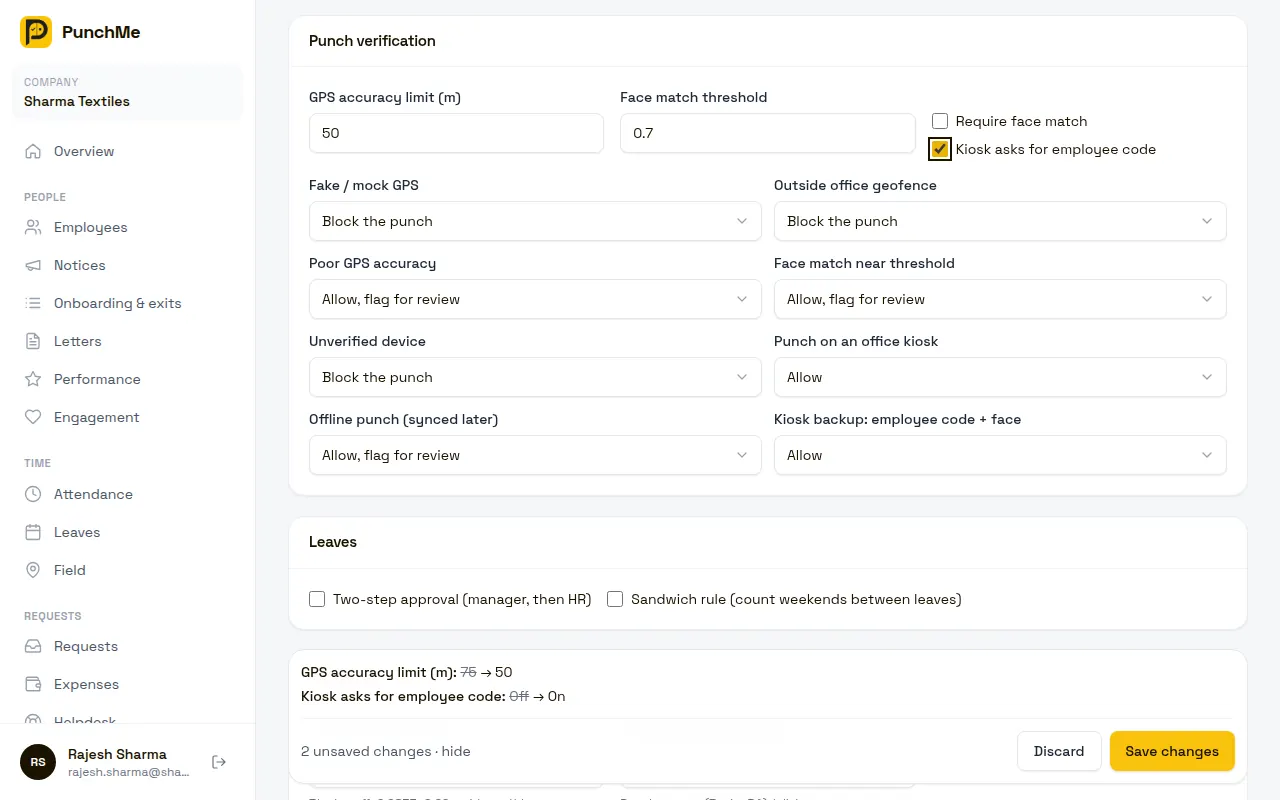
- Dashboard rule: Settings, Punch verification, rule Offline punch (synced later).
- Review: Attendance, Flagged punches tab. Offline punches also show "offline punch" in the Flags column of the Daily tab.
How an offline punch works
- The employee taps the punch button. The app tries to reach PunchMe and gets no answer.
- If your company uses face check, the face scan runs on the phone with two random liveness steps.
- The app gets a GPS location. Location is required. Without it the punch is not saved.
- The app saves the punch, signed with the phone's registered device key, and shows "Saved on phone — will sync".
- The home screen flips to the next action, so a check-in shows Check out next.
- When the app opens, comes back to the front, or a network connects, it sends the saved punches.
- The app shows "Offline punch synced", or "Offline punch not accepted: ..." with the reason.
The signature means a saved punch can't be edited on the phone. If anyone changes it, the server rejects it.
What the server checks when it syncs
Each saved punch is checked on its own:
| Check | Result if it fails |
|---|---|
| Signed by the phone currently registered to the employee | Rejected: "Signature check failed" |
| Punch is less than 72 hours old | Rejected: "Older than 72 hours — ask HR for a correction" |
| Punch time is not more than 5 minutes in the future | Rejected: "Phone clock is ahead — fix the date and time" |
| Same punch already received | Marked duplicate and skipped quietly |
| Face match (if face check is on) | Same 1:1 check as an online punch |
| GPS and geofence | Same checks as an online punch, using the location saved at punch time |
| Normal punch rules | For example, "You've already checked in today" |
Punches in one sync are applied in the order they were made, so a check-in always lands before its check-out.
A punch is identified by the phone, its exact time and its type. If the app sends the same punch twice, for example after a weak connection, it is only recorded once.
Turning it on or off
The rule Offline punch (synced later) in Settings, Punch verification has three options:
| Option | What happens |
|---|---|
| Allow, flag for review (default) | The punch is recorded and goes to Flagged punches |
| Allow | The punch is recorded and tagged "offline punch", no review |
| Block the punch | The punch is rejected when it syncs |
What happens when it's on
- The punch is recorded with the phone's time at the moment of the punch.
- With the default setting, every offline punch waits in Flagged punches. Approving keeps it. Rejecting marks the day absent.
- Other flags still apply. An offline punch outside the geofence may carry both "offline punch" and "outside geofence".
Why flag by default? An offline punch uses the phone's clock. Someone could set the clock back, turn off data and punch "on time". The 72-hour limit and the review step keep this in check.
What happens when it's off
When set to Block the punch, the app still saves the punch on the phone, because it can't know your rule without network. When it syncs, it is rejected with "Your company doesn't accept offline punches — punch again when you're online". The employee then needs a correction for that time.
Changing it midway
- The rule applies when a punch syncs, not when it was saved. If you change the rule while punches are waiting on phones, the new rule applies to them.
- Offline punches already recorded keep their flags. Changing the rule doesn't add or remove flags on old records.
Limits and edge cases
- 72-hour window. A punch older than 72 hours when it syncs is rejected. Open the app on Wi-Fi or data at least once every 3 days.
- Signing out deletes unsynced punches. The saved queue is cleared on sign-out, so it can't sync under another account. Sync before signing out.
- Device reset by HR. If HR resets the employee's device binding, saved punches stay on the phone but can't be verified with the new registration, so they are likely rejected when they sync (the app shows the reason). Sync before the reset, or use a correction.
- Phone clock ahead. If the phone's clock is more than 5 minutes ahead, the punch is rejected. Set the phone to automatic date and time.
- Forgotten check-out closed already. If an offline check-out syncs after PunchMe has auto-closed that check-in (after 20 hours), it is rejected with "No open check-in found".
- Up to 50 per sync. The app sends up to 50 saved punches at a time. Any left over go in the next sync.
- Play Integrity is not checked offline. The device-key signature still proves which phone made it.
- Liveness runs on the phone. Offline, the liveness steps are chosen by the app, not by the server.
- Undo checkout is not available offline.
- Field tracking location sharing is separate and does not use this queue. See Field tracking.
Related
Common questions
How does the employee know a punch is saved and not lost?
The app says "Saved on phone — will sync" and the punch button changes to the next action. After sync, it says "Offline punch synced".
An offline punch was rejected. What now?
The app shows the reason. For most reasons, the employee sends a correction request for that day with the right times.
Can staff abuse offline mode to punch late and claim early?
They would need to change the phone clock and stay offline. Keep the rule on Allow, flag for review so HR checks each one. The location saved with the punch also shows where it was made.
Does the employee need to do anything to sync?
No. Opening the app, or the phone reconnecting to a network while the app is running, is enough.
Do offline punches show up in reports?
Yes, once synced, they are normal attendance records with the original punch time and an "offline punch" flag.