Billing, prepaid wallet, free trial and GST invoices
Updated 2026-11-07
What it is
PunchMe is billed from a prepaid wallet. You add money to the wallet through Razorpay, and at the start of each monthly period PunchMe takes that month's charge from the wallet in advance. There's no auto-debit, card mandate or subscription.
The monthly charge is:
Active employees at renewal (minimum 1) × your plan rate + 18% GST
PunchMe is a product of Hostspica. Hostspica collects the payment and issues the GST tax invoice for every monthly charge.
Who uses it
| Task | Permission |
|---|---|
| See the Billing page: balance, status, next charge, invoices, wallet history | billing.view |
| Add money to the wallet | billing.manage |
| Get low-balance and payment-due alerts | Owner, plus whole-company members with billing.manage |
| Get trial reminders | Owner only |
Out of the box, the owner and the Office Manager role can add money. Office HR can only view. The HR role has no billing access. See Roles and permissions.
Where to find it
- Dashboard: Billing in the left menu, under Money.
- The banner at the top of the dashboard shows when your trial ends, or that the account is paused, with a link to Billing.
- Employees never see billing. If the account is paused, the employee app says the company's account is on hold.
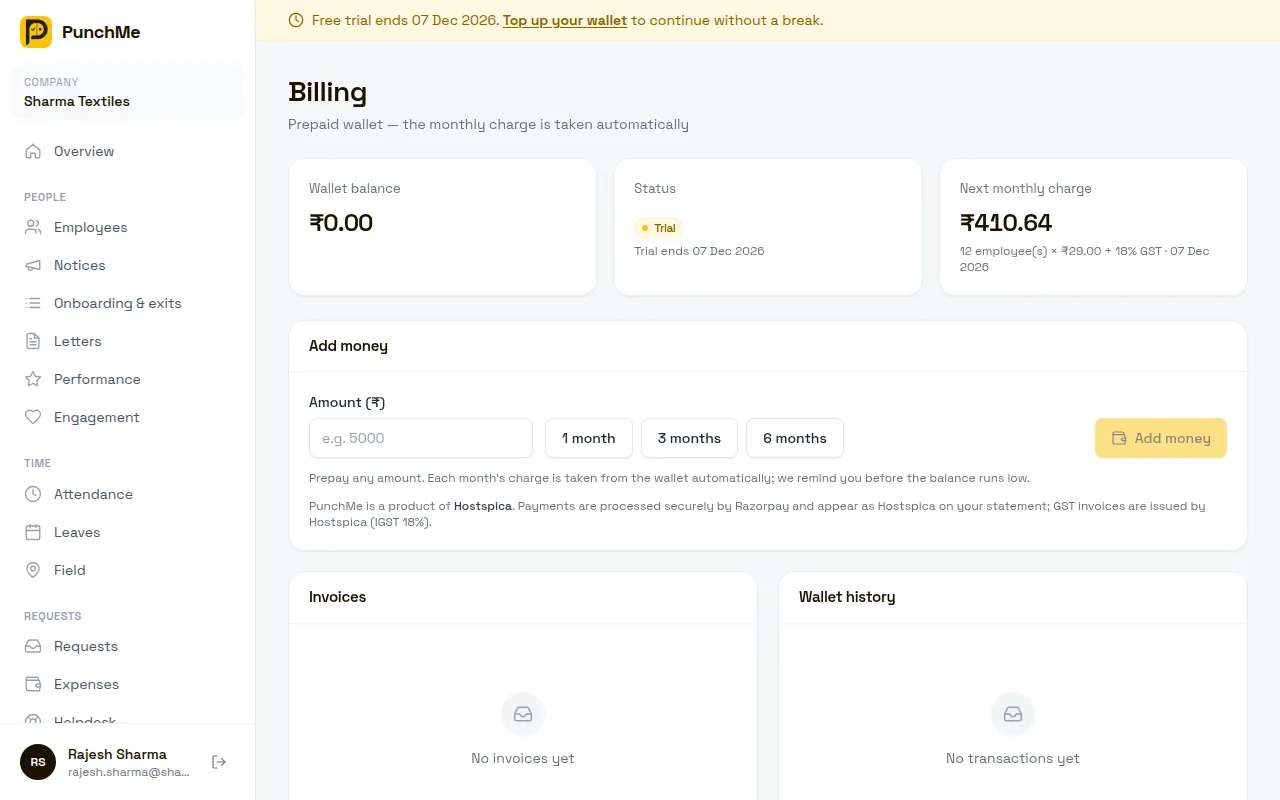
Your free trial
Every new company starts on a free trial, 30 days by default. No card is needed.
- The banner shows the trial end date.
- The owner gets an in-app notification and an email 7 days, 3 days and 1 day before the trial ends, and once when it ends.
- PunchMe can extend a trial. If it does, the reminders start again for the new end date.
- When the trial ends, the first month is charged from the wallet automatically if the balance covers it, and PunchMe keeps running with no break. If it doesn't, the account is paused until the first month is paid. Your data is kept.
Starting the first paid month. Top up during the trial and the first month is charged from your wallet when the trial ends; the paid month starts on the trial end date. If the trial has already ended and the account is paused, the red Pay ₹… to resume PunchMe now button on Billing shows exactly how much you need to add. Any balance you already have is used first, and the button asks only for the shortfall.
How the monthly charge works
| Item | How it's worked out |
|---|---|
| Seats | Employees with status Active at the moment of renewal. Minimum 1. |
| Rate | Your plan rate per employee per month, shown on Billing under Next monthly charge |
| GST | 18% of seats × rate |
| Period | One calendar month from the renewal date, for example 15 Mar to 15 Apr |
The Next monthly charge card shows the amount and date based on today's employee count. The final amount uses the count at renewal.
What counts as an active employee:
- Counted: status Active.
- Not counted: status Inactive, and archived employees.
- Not counted: team members invited from Team & roles, unless they're also added as employees.
There's no proration. Someone added mid-month is first billed at the next renewal. Someone archived mid-month doesn't get a partial refund for that month.
Adding money
- Open Billing.
- In Add money, type an amount in rupees, or click 1 month, 3 months or 6 months to fill in that many monthly charges.
- Click Add money and pay in the Razorpay window by UPI, card, net banking or wallet.
- When payment succeeds, you see "Payment received — wallet updated."
Details:
- Any amount from ₹1 to ₹10,00,000 per payment.
- The payment shows as Hostspica on your bank or card statement.
- If you close the browser after paying, the wallet is still credited once Razorpay confirms the payment, usually within a few minutes.
- Each payment is credited once, even if confirmation arrives twice.
- Wallet balance doesn't expire.
Low balance and pauses
| When | What happens |
|---|---|
| 3 days before renewal, wallet short | Billing staff get one in-app notification and one email: the charge amount, the date and the current balance. |
| At renewal, wallet enough | The charge is taken, a GST invoice is created, and Paid until moves one month forward. |
| At renewal, wallet short | The account is paused (status overdue). Billing staff get one notification and email with the amount to add. |
| You add enough while paused | The charge is taken straight away and the account resumes. The new month starts from the day you pay. |
While the account is paused:
| Paused account | |
|---|---|
| Dashboard | Only Billing and notifications open. Other pages show the pause banner. |
| Employee app | Shows "Your company's PunchMe account is on hold". Employees can't punch. |
| Kiosks | Show the same on-hold message |
| Manager app | Same as the dashboard |
| Automatic daily jobs | Paused: auto-absent marking, shift reminders, leave carry-forward, overtime, document-expiry alerts |
| Your data | Kept |
GST invoices
PunchMe creates one GST tax invoice for each monthly charge. Top-ups don't get an invoice, because a top-up is a prepayment, not a sale.
- Find them: Billing → Invoices → View. The invoice opens in a new tab. Use your browser's Print → Save as PDF.
- Number:
PM+ financial year + a running number, for examplePM2627/000123for FY 2026-27. - Seller: Hostspica, GSTIN 09KGCPK3156D1ZE, Ghaziabad, Uttar Pradesh.
- Buyer: your company name, address, state and GSTIN from Settings → Company, as they were at the time of the charge.
- Tax: CGST 9% + SGST 9% if your state is Uttar Pradesh. IGST 18% for any other state, or if the state is blank.
- SAC: 997331. Reverse charge: No.
- No GSTIN? The invoice says "Unregistered (no GSTIN)". Add your GSTIN in Settings → Company to claim input tax credit on future invoices.
The Invoices list shows your last 100 invoices. Wallet history shows the last 200 entries: top-ups, monthly charges, and any credit or debit made by PunchMe support.
Turning it on or off
Billing can't be switched off. To stop paying, stop topping up: when the wallet can't cover a renewal, the account pauses and no further charge is taken. To close the account and delete your data, the owner emails support@punchme.online.
Changing it midway
| Change | Effect on billing |
|---|---|
| Add employees | Billed from the next renewal |
| Archive an employee or set them Inactive | Not counted from the next renewal. No refund for the current month. |
| Reactivate an Inactive employee | Counted again from the next renewal |
| Change company name, address, state or GSTIN | Applies to invoices from the next charge. Past invoices don't change. |
| PunchMe changes your plan rate | Applies from the next renewal. Only PunchMe can change plans. |
| Top up while active | Added to the balance. Used at the next renewal. |
Limits and edge cases
- One payment is at most ₹10,00,000. Make several payments for more.
- A month is charged once. If two renewals run at the same moment, only one charge is taken.
- A paused account restarts on a fresh month from the day you pay, not from the old renewal date. You aren't charged for the days it was paused.
- Accounts that PunchMe has suspended don't resume by topping up. Email support@punchme.online.
- Monthly charges are non-refundable. You can ask for unused wallet balance back when you close the account. See the refund policy.
- If money left your bank but the wallet wasn't credited within a few hours, email support@punchme.online with the Razorpay payment ID.
Related
Common questions
How much do I need to top up for one month?
Click 1 month in Add money. It fills in the next monthly charge, including 18% GST, based on today's active employee count.
Do I get a GST invoice for my top-up?
No. You get a GST tax invoice for each monthly charge, which is when the service is billed. Find them under Billing → Invoices.
Why does my invoice show IGST instead of CGST and SGST?
Your State in Settings → Company isn't Uttar Pradesh, or it's blank. CGST + SGST applies only within Uttar Pradesh, where Hostspica is registered.
An employee left on the 5th. Will I be refunded for the rest of the month?
No. Charges aren't prorated. Archive them now and they won't be counted from the next renewal.
My trial ended and I already have money in the wallet. Why is the account paused?
The balance doesn't cover the first month (employees x rate + 18% GST). Add the shortfall shown on the Pay ₹… button and the first month is charged straight away.
Can I set up auto-pay?
No. PunchMe uses a prepaid wallet only. Top up several months at once with 3 months or 6 months to avoid paying every month.